
Help centerศูนย์ความช่วยเหลือ
Getting started with Pony, common questions, and how to reach the team.
Get started in 3 steps
Sign up your company free
Create your company on Pony with the free Lite plan; no card needed.
Add your team
Add employees one by one or import from Excel, then send the team their invite link.
Clock in from the phone
Staff open the link in the browser, sign in and clock in. No app to install.
What staff see in Pony
Real Pony screen · demo shop, made-up name
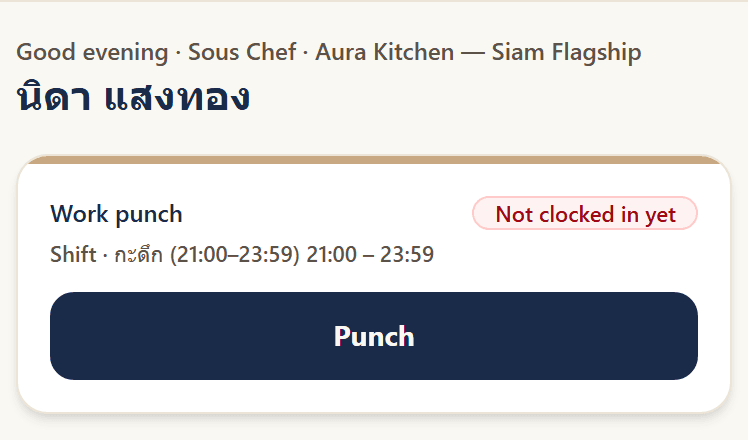
- Add to home screen
- iPhone: open in Safari, tap Share, then «Add to Home Screen» · Android: open in Chrome, tap the menu, then «Add to Home screen»
- Turn on notifications
- Tap «Turn on notifications» on the Pony card and allow them. On iPhone, add Pony to the home screen first.
- Owners get email
- Requests waiting for approval and payroll periods ready to check go to the owner and admins by email.
Common questions
How is pricing calculated?
Lite is free for teams of up to 10. Starter is ฿39 and Growth ฿59 per employee per month, counting only current employees (including probation). Starter has a 10-employee minimum and Growth 30. When headcount changes, the next bill adjusts.
Do we need to install an app?
No. Staff open Pony in the browser on any phone — nothing to download or update. They sign in with email, or with Google, Microsoft or LINE. To open it faster, add Pony to the home screen.
What if a clock-in fails?
If someone is outside the area or GPS is unavailable, Pony says how far from the branch they are and offers a one-tap “request time certification”. The supervisor gets a browser notification and certifies it in Pony; the certified time is recorded along with who certified it.
Do you support rotating shifts like 2 shifts × 3 crews or 4-on-4-off?
Yes, on Growth. Group staff into crews, pick a rotation (2 shifts × 3 crews, 3 shifts × 4 crews, 4-on-4-off, or your own), preview every crew's days, then fill the roster in one step. Staff see their own rotation in Pony and can ask to swap a shift; Pony suggests people who are off that day.
Can different employee groups have different OT rules?
Yes, from Starter. Give a group its own OT counting, rounding and hour caps; everyone else keeps the company OT settings. OT over the cap cannot be requested or approved, and staff and supervisors see it in Pony when they get close.
Can Pony pay night-shift, OT-meal and attendance allowances?
Yes, from Starter. Set them once and they land on each payslip automatically. Attendance bonuses can be tiered, and you choose which allowances count for income tax and social security.
Can managers or field staff skip clocking in?
Yes, from Starter. Mark a group as not required to clock in, or optional; Pony will not count them absent or late, or deduct their pay.
Is our data safe?
Each company's data is kept separate. Sensitive fields such as national ID, bank account and GPS location are encrypted with AES-256, and the database is backed up, encrypted, every night. Read the personal data policy
Can we file social security and PND 1 from Pony?
Pony exports template filing files (CSV) from each payroll period: social security contributions per person and the employer total, withholding tax per person for PND 1, and the salary transfer list. Copy or import them into the social security, Revenue Department and bank systems. They are not official forms and Pony does not file for you yet, so have your accountant check the totals first.
Can we bring our existing employee data?
Yes. Import your staff list from an Excel or CSV file yourself, or email the Pony team at hello@getpevo.com for help. For Founding Partners the team imports up to 5 years of history at no cost.
Can we cancel? Is there a contract?
Starter and Growth are billed monthly with no contract. Cancel or step down yourself on the plan page in the app; you keep the plan until the billing period ends, and a cancelled plan moves back to free Lite. Enterprise follows the agreement made with the team.
Contact the team
hello@getpevo.com · We reply within one business day