Open it in the browser.
No app to install.เปิด⁠ในเบราว์เซอร์ ไม่⁠ต้อง⁠ลง⁠แอป

For teams across branches and shifts. Staff use Pony from any phone and get notified even with the page closed; if a clock-in fails, one tap asks the supervisor to certify it. Owners and HR see every branch and run shifts, leave, OT and payroll on a big screen.

Free for up to 10 people, no expiry · We reply within one business day

One clock-in, stop by stop

Real Pony screens · demo shop, made-up names (shown in English)

  1. 22:40

    Tap to clock in

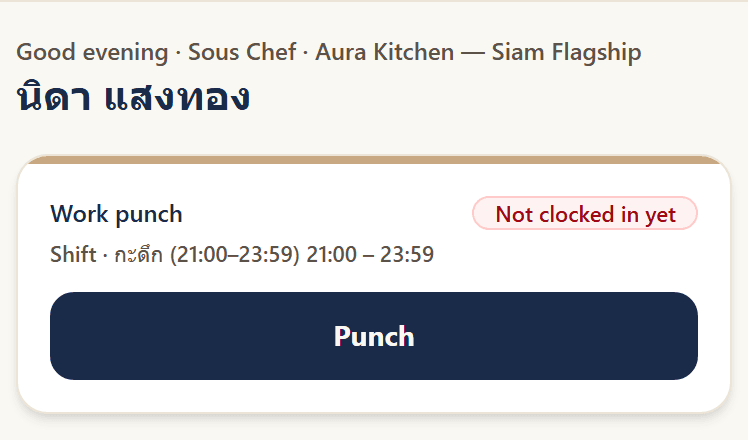
    Nida's clock card: shift 21:00–23:59, not clocked in yet, with a Punch button

    The card shows tonight's shift, 21:00–23:59, and one «Punch» button. Pony checks GPS against the branch radius.

  2. 22:40

    Saved at once

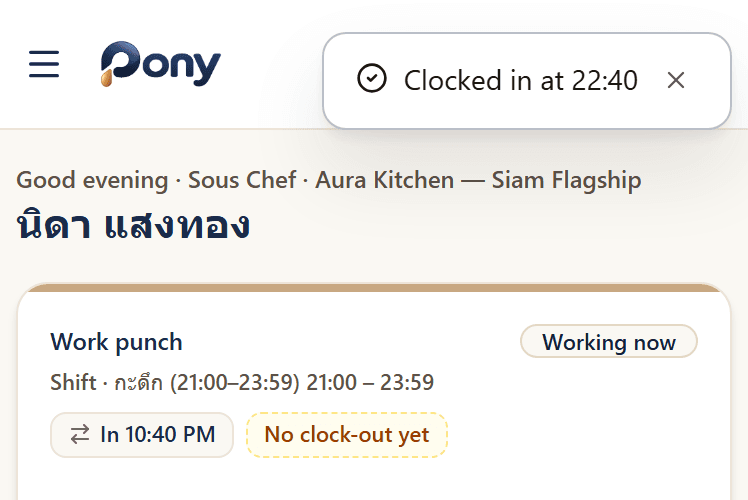
    After punching: a toast reading Clocked in at 22:40, status Working now, In 10:40 PM

    «Clocked in at 22:40» shows right away and stays in the clock-in history, ready to look back at any time.

  3. If it fails

    Ask to certify

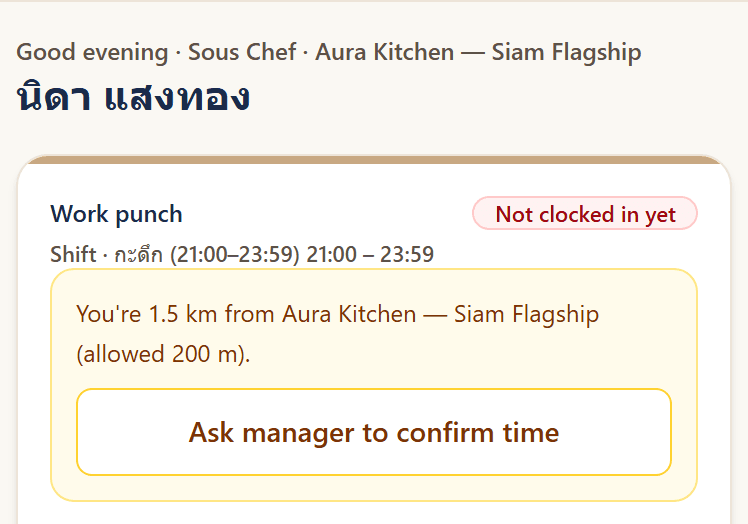
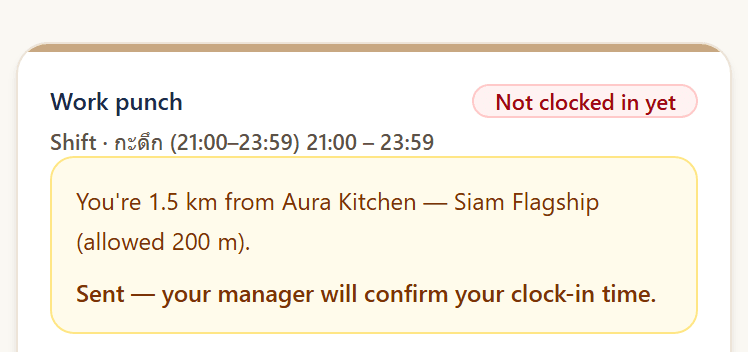
    Clock-in refused: 1.5 km from the branch, allowed within 200 m, with an Ask manager to confirm time button

    Another night, away from the branch: the screen says «1.5 km away, allowed within 200 m», then one tap on «Ask manager to confirm time».

Who each step
works for

Staff see their own shift before they tap

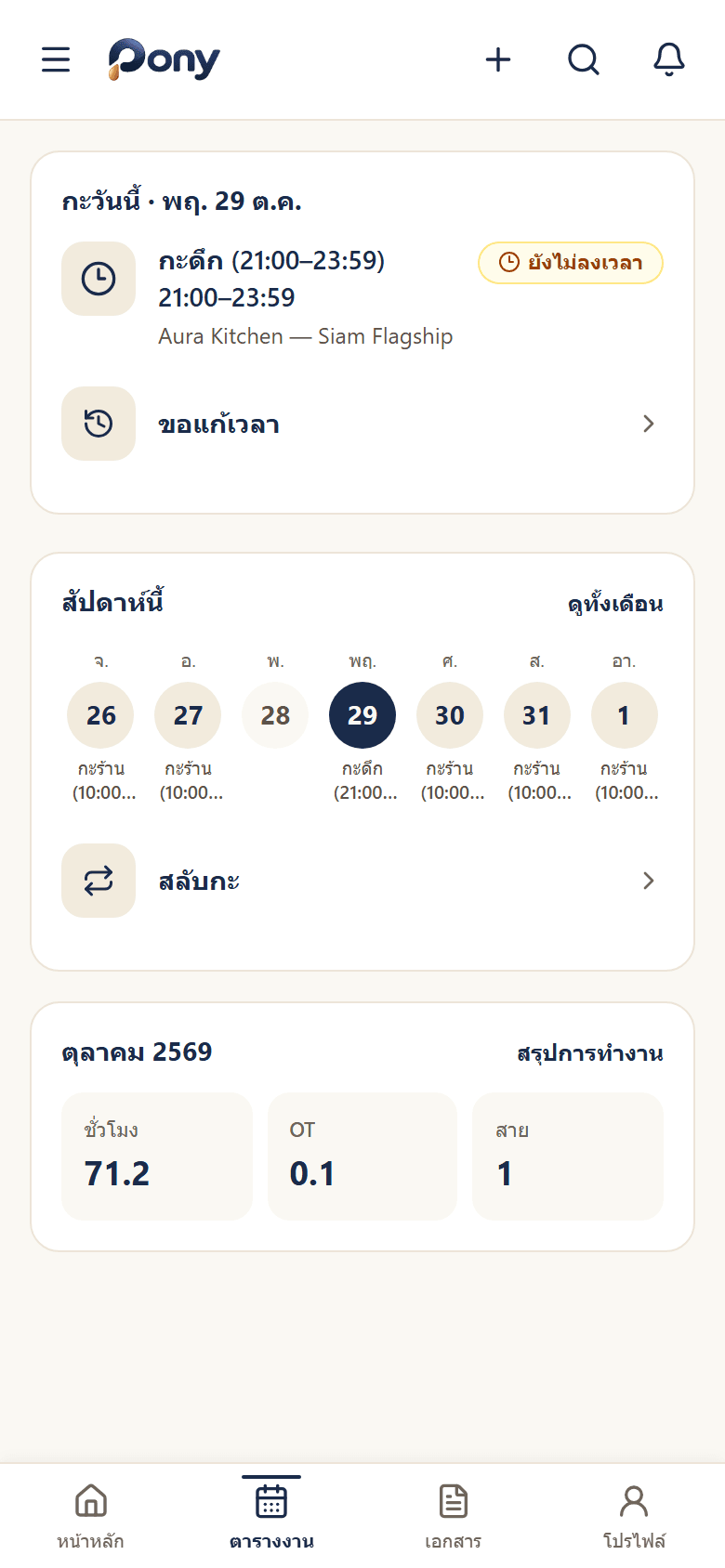
They open Pony in the browser on their phone and see today's shift, the week's shifts and the hours worked this month. No app to install, no scanner to queue for.

  • Sign in with email, or Google, Microsoft or LINE
  • GPS against each branch's radius
  • Ask to fix a time or swap a shift from the same screen
Staff schedule: today's shift, the week's shifts and the October summary of 71.2 hours

A clock-in history, kept as proof

Every clock-in is saved with the time and branch in the clock-in history, and staff can look back on their own. No screenshots to keep. On every plan.

After punching: a toast reading Clocked in at 22:40, status Working now, In 10:40 PM

A failed clock-in is not a dead end

Outside the radius or no GPS, the screen says why, for example 1.5 km from the branch. Tap «Ask manager to confirm time» and the request reaches the supervisor at once; staff don't chase anyone.

  • The request carries the server's time
  • Certifying records who certified

Change here: the supervisor certifies in Pony

Staff
Request sent, waiting for the supervisor to confirm the clock-in
Supervisor
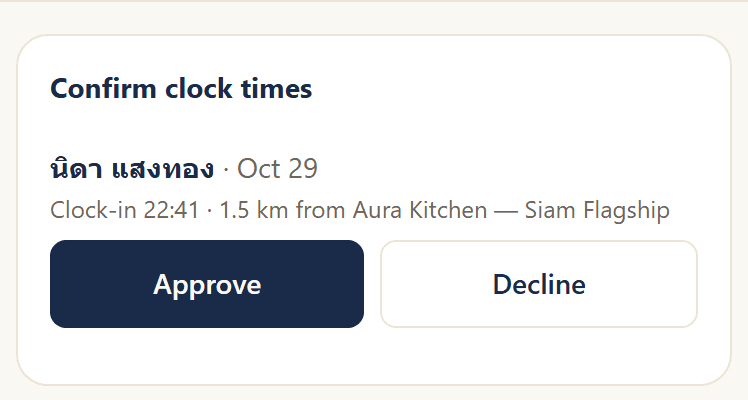
Supervisor side: Nida's clock-time request at 22:41, 1.5 km from the branch, with Approve and Decline

Owners and HR see the whole team on the web

Clock-ins from every branch in one place: who's in, who's late, who hasn't clocked in. Then a payroll period built from real time data. The web side comes with every plan, free Lite included; OT rules by group and allowances start at Starter, rotating crews come with Growth.

  1. Team today

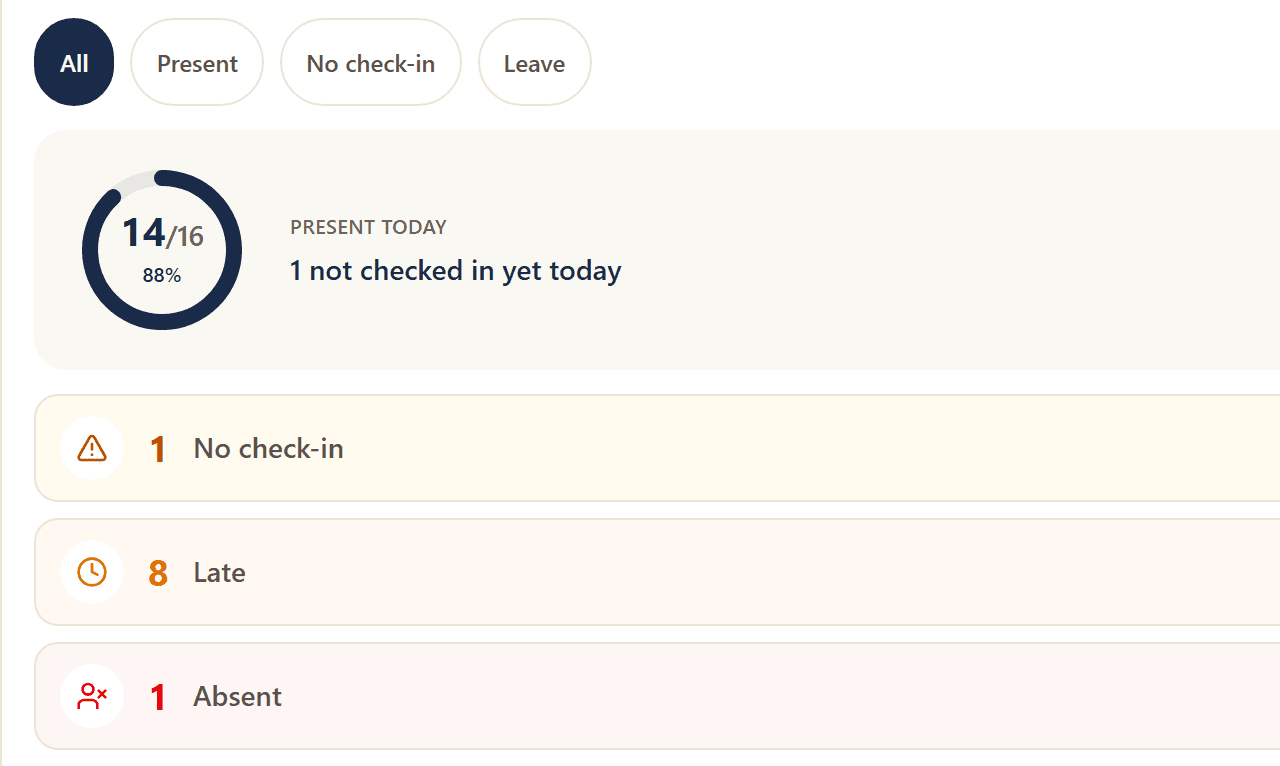
    Team today on the web: 14 of 16 in, 1 not clocked in, 8 late, 1 absent
  2. Payroll draft

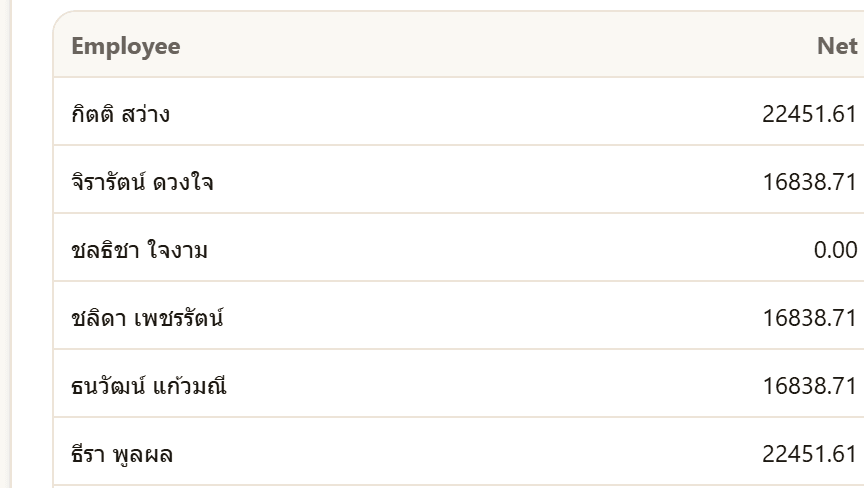
    Payroll draft for 1–29 Oct on the web: employees and net pay
  3. Rotating crews

    Growth
    HR, on the web
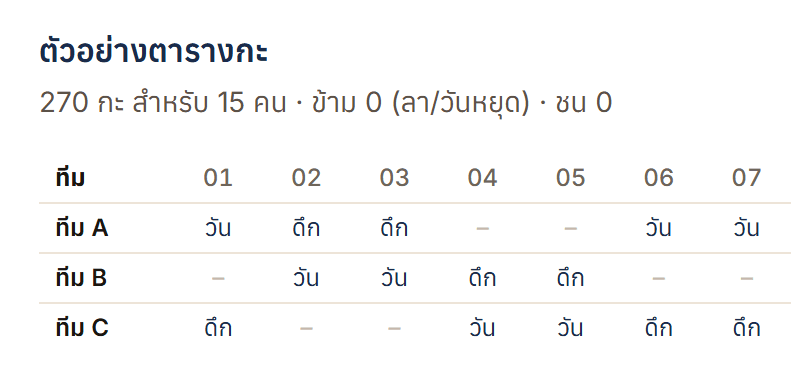
    Crew rotation preview on the web: crews A, B and C alternate day and night shifts and days off over the first week of a 270-shift roster for 15 people
    Staff, on their phone
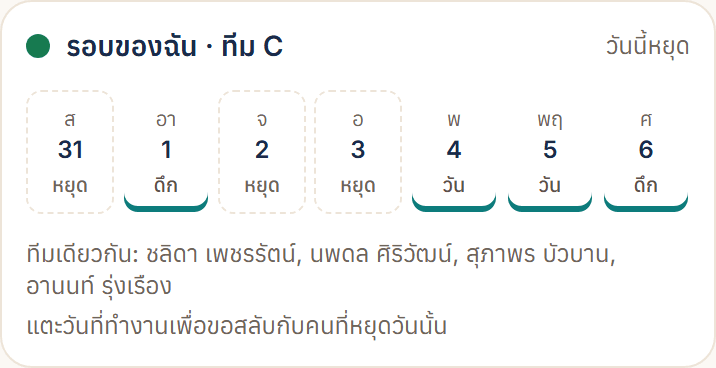
    «My rotation» for crew C: off Saturday, night shift Sunday, two days off, then day, day, night; tap a working day to swap it
  4. Allowances on the payslip

    Growth
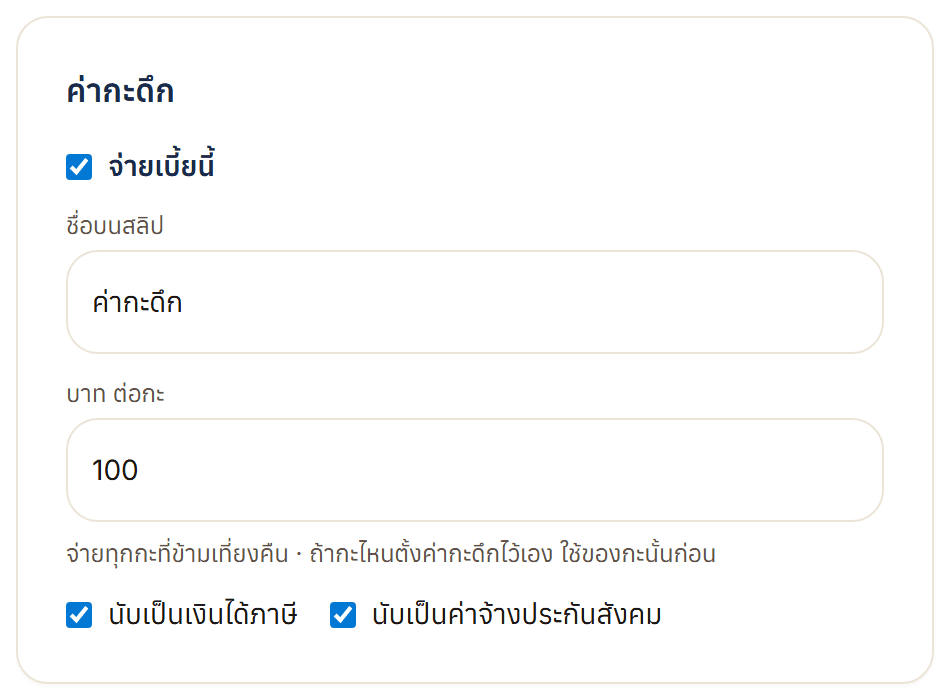
    Night-shift pay setting on the web: ฿100 a shift for every shift that crosses midnight, counted for income tax and social security

Real Pony screens · demo shop, made-up names and amounts; Growth screens in Thai

How your team's data is kept

Read all about security
Each company kept apart
People only ever see their own organisation's data.
AES-256-GCM encryption
Personal details, pay and GPS are encrypted before they're stored.
Nightly backups
The database is backed up, encrypted, every night.

Founding Partner: Pony Enterprise free for a year

For the first 20 organisations that will use Pony for real and tell us what to fix, so Pony grows with Thai businesses.

Apply by emailGoes to hello@getpevo.com · We reply within one business day
  • Limited to 20 organisations
  • Free for one year from the day you start using it
  • After a year, pick a plan at the normal price; nothing is charged automatically
  • We set it up and bring your existing data in

Priced per employee. Start free.

We count active and probation employees. Teams of 30–50 can pick Starter or Growth. Upgrade to either in the app and pay by card; a plan change shows on the next bill.

Pony plans
PlanPriceForIncludesGet started
Lite฿0No expiryUp to 10 people
  • GPS clock-in and shifts
  • Leave, OT and time fixes with approval
  • Payslips and salary advance
  • Day-to-day overview on the web
  • Pony Magic 150 a month
Sign up free
Starter฿39per person / month10–50 people
  • Everything in Lite
  • Several clock-in modes
  • OT rules and caps by group
  • Night-shift, OT-meal and attendance allowances
  • Pony Magic 500 a month
Start free, upgrade in app
GrowthRecommended฿59per person / month30+ people, no cap
  • Everything in Starter
  • Rotating crews; staff ask to swap in Pony
  • Talent insights
  • Approval flows you design
  • Our team sets it up with you
  • Pony Magic 2,000 a month
Book a demoWe reply within one business dayOr upgrade yourself in the app
EnterpriseContact usPriced on scopeOrganisations with a specific scope
  • Everything in Growth
  • Setup and care scoped by agreement
  • A direct line to the Pony team
Email usWe reply within one business day

Pony Magic is the AI helper inside Pony; each request counts once. Clock-ins, leave and payroll keep working when the quota runs out.

Questions

How is pricing calculated?

Lite is free for teams of up to 10. Starter is ฿39 and Growth ฿59 per employee per month, counting only current employees (including probation). Starter has a 10-employee minimum and Growth 30. When headcount changes, the next bill adjusts.

Do we need to install an app?

No. Staff open Pony in the browser on any phone — nothing to download or update. They sign in with email, or with Google, Microsoft or LINE. To open it faster, add Pony to the home screen.

What if a clock-in fails?

If someone is outside the area or GPS is unavailable, Pony says how far from the branch they are and offers a one-tap “request time certification”. The supervisor gets a browser notification and certifies it in Pony; the certified time is recorded along with who certified it.

Do you support rotating shifts like 2 shifts × 3 crews or 4-on-4-off?

Yes, on Growth. Group staff into crews, pick a rotation (2 shifts × 3 crews, 3 shifts × 4 crews, 4-on-4-off, or your own), preview every crew's days, then fill the roster in one step. Staff see their own rotation in Pony and can ask to swap a shift; Pony suggests people who are off that day.

Can different employee groups have different OT rules?

Yes, from Starter. Give a group its own OT counting, rounding and hour caps; everyone else keeps the company OT settings. OT over the cap cannot be requested or approved, and staff and supervisors see it in Pony when they get close.

Can Pony pay night-shift, OT-meal and attendance allowances?

Yes, from Starter. Set them once and they land on each payslip automatically. Attendance bonuses can be tiered, and you choose which allowances count for income tax and social security.

Can managers or field staff skip clocking in?

Yes, from Starter. Mark a group as not required to clock in, or optional; Pony will not count them absent or late, or deduct their pay.

Is our data safe?

Each company's data is kept separate. Sensitive fields such as national ID, bank account and GPS location are encrypted with AES-256, and the database is backed up, encrypted, every night. Read the personal data policy

Can we file social security and PND 1 from Pony?

Pony exports template filing files (CSV) from each payroll period: social security contributions per person and the employer total, withholding tax per person for PND 1, and the salary transfer list. Copy or import them into the social security, Revenue Department and bank systems. They are not official forms and Pony does not file for you yet, so have your accountant check the totals first.

Can we bring our existing employee data?

Yes. Import your staff list from an Excel or CSV file yourself, or email the Pony team at hello@getpevo.com for help. For Founding Partners the team imports up to 5 years of history at no cost.

Can we cancel? Is there a contract?

Starter and Growth are billed monthly with no contract. Cancel or step down yourself on the plan page in the app; you keep the plan until the billing period ends, and a cancelled plan moves back to free Lite. Enterprise follows the agreement made with the team.


See it with your
own branches and shifts

Email us your branches and shifts, and we'll show you how your organisation should be set up.

We reply within one business day